A WorkLife FrameWork™ Blog |
|
About A WorkLife FrameWork | Purchase
Posted on: Monday, October 19, 2009 at 09:14 PM UT Notebook Version I use A WorkLife FrameWork all the time I have Mathematica running. I am pretty much lost without it, but I designed it that way. So one aspect of that is that it ends up being compatible with every release of Mathematica. It was the first Mathematica application compatible with version 6.0. And when Mathematica 7 was released it was compatible with it. The current version of A WorkLife FrameWork on the Scientific Arts website is 3.0β. Why β? Frankly it's because I keep on adding new things to the product and, because my "day job" takes up much of my time, I still need to bring all of the documentation up to date. That, in fact, is one of the reasons why I posted the Documenting Screencast: just so users can get a detailed example of how to use that new functionality. But I continue to add new things that either users have asked for, or that I need for my own work. So, for example I have added the ability to add comments to blogs (comments are emailed directly to you so you can moderate them). Another feature that has been added to the blogging tools is the ability to include arbitrary raw HTML code which will be inserted into the blog entry. This is particularly useful if you want to include youtube videos in your posting like this:
Or you can include Google Maps Or you can include animations created from Mathematica and saved as, for example, a Flash video. In fact, any particular HTML that you want to include in a blog posting (for example custom forms and JavaScript) can be added:
Another functionality that has been added to A WorkLife FrameWork is an expansion of its emailing tools to allow direct email from Mathematica via Version 7's SendMail function. And indeed there are dozens of changes since version 2. In a way I find it hard to get this version out of β. And I may just adopt a new model of continual updates rather than the more traditional naming of versions... For the time being though I will stick to this nomenclature. You can tell when your version was created by executing $WorkLifeFrameWorkBuildDate in your Mathematica session after loading the package:
Then just compare it to the date on the download link at the bottom of the Download Page. If that version is newer, then just download it and install it (all of your settings will be preserved and you will not need to reenter your password). As always, updates are free. And if you do not have a license, you can try the product (fully functional) for 30 days. Permalink | Notebook Version | Comments | Send Comment... Posted on: Wednesday, August 5, 2009 at 12:53 AM UT I have added a new screencast at http://www.scientificarts.com/worklife/screencasts/ that shows how to use the documenting tools in A WorkLife FrameWork. These tools (available through the DocumentingPalette) allow you to simply convert properly prepared Mathematica notebooks into material that can then be available through the Documentation Center. To make use of these tools it is best to be using the most current version of A WorkLife FrameWork which is available via the download link on http://scientificarts.com/worklife/purchase/. Permalink | Comments | Add Comment... Mathematica 7 and A WorkLife FrameWork 3.0 Posted on: Wednesday, November 19, 2008 at 03:28 PM UT Mathematica 7 was just released and A WorkLife FrameWork is fully compatible with it. When Mathematica 6 was released, A WorkLife FrameWork was the first add-on package that was compatible with it—on the first day of the Version 6 release. And A WorkLife FrameWork is fully compatible with Mathematica 7 on the first day of its release. A WorkLife FrameWork version 3.0 is in a late beta stage and is currently available to all users. It is the version that I use every day and I have made it available for some while to all current users, as well as all of those people who are exploring the fully functional trial version. I have increased the trial period from 15 days to 30 days. The final release for Version 3.0 of A WorkLife FrameWork will likely have a price increase from $150 to $195 (student, academic, and retiree price will remain at $100). But until I complete the release cycle the price will remain unchanged. The beta version is largely finished except for some aspects involving updating the documentation and perhaps the addition of some additional features. Download the version 3.0 trial here: http://scientificarts.com/worklife/trial.html As has been my policy, upgrades will be free to version 3.0 for all current users. If you are a current user or are currently trying A WorkLife FrameWork, you should download the current beta. Enjoy exporing the wide range of of tools in A WorkLife FrameWork that E x p a n d the reach of Mathematica's notebook interface. Users consider it an indespensible and addictive productivity tool. ...of course this blog is created directly from Mathematica using A WorkLife FrameWork... Permalink | Comments | Add Comment... Posted on: Monday, November 17, 2008 at 07:51 PM UT I gave a talk at this year's International Mathematica User Conference titled: "The Joy of Tagging." It covers some useful tricks for creating tools that manipulate the content of notebooks. And these are some of the tricks that I use internally throughout A WorkLife FrameWork to implement all sorts of things. You can get the notebook version of this talk from http://scientificarts.com/worklife/notebooks/ Here is the abstract of the talk: One of the key elements of a Mathematica application that deals with a variety of documents is tagging. Mathematica's user interface for the tagging of notebooks is minimal, even though the functional interface is very powerful. This talk is about the tricks of the trade for tagging and manipulating notebooks that I have learned and discovered through creating a very large document-oriented Mathematica add-on called A WorkLife FrameWork. A great deal of tagging of notebooks is done in A WorkLife FrameWork, and this is used to create a very wide range of functionalities to automatically navigate among content, as well as to nonlinearly extract desired content from notebooks that have a random assortment of material in them—the wheat from the chaff. Also, A WorkLife FrameWork provides user interface tools to enhance and make much more useful Mathematica's tagging potential. I will describe how these tools were created and provide useful examples. The tricks that I will describe will allow you to design your own tagging tools whether or not you have a license to A WorkLife FrameWork. Permalink | Comments | Add Comment... The Mathematica Documentation Center Posted on: Friday, April 18, 2008 at 07:41 PM UT Notebook Version It is not a very simple matter to add new material to the Mathematica Documentation Center. One key reason is that Wolfram Research has not yet released tools to doing this. One suite of such tools will reside within Wolfram WorkBench, and the version of WorkBench that contains these is currently in Beta. A set of tools will also be included in the next version of A WorkLife FrameWork. The Documentation Center tools included in Wolfram WorkBench require that your locus for you work be centered n WorkBench: this is the habit of some Mathematica programmers and this services that community. The tools that will be included in A WorkLife FrameWork are strictly Mathematica-centric and allow you to keep your work's focus within Mathematica. In this way the two different toolsets are helpfully complementary. The tools contained in the next version of A WorkLife FrameWork will enable you to convert arbitrary notebooks into a form that can automatically be placed in the Documentation Center—this includes documentation for packages that you write and wish to distribute to others. But it also includes documents—in the absence of a package—that you want to distribute so that people can read and interact with them through the Documentation Center. The Mathematica Documentation Center is actually a very plastic environment for adding material to Mathematica, but to do so you currently need to understand quite a bit of arcana that pertains to Paclets and to the formatting and tagging of notebooks. There have been many questions over the past year or so on MathGroup on how to format and prepare material for the Mathematica Documentation Center. And in the course of creating tools for the next version of A WorkLife FrameWork I have learned quite a bit about how to do this. So, in the interest of helping people at least get started on this, I wrote up some of what I have learned so that I could share it with the larger Mathematica community. I have placed this write-up in a Mathematica notebook which you can download from here: http://www.scientificarts.com/worklife/notebooks/ I hope that this is helpful to folks.... Permalink | Notebook Version | Comments | Send Comment... Posted on: Sunday, March 2, 2008 at 08:01 PM UT Notebook Version
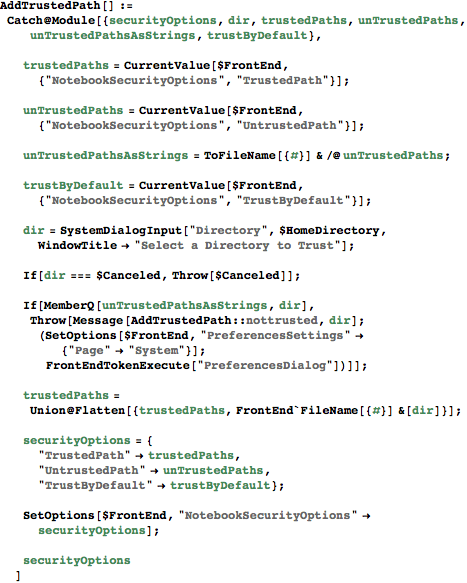
When creating a general system in Mathematica like A WorkLife FrameWork (http://scientificarts.com/worklife) I often need to process multiple notebooks to gather data from those notebooks to distill and present to the user. Often I open these notebooks with the option Visible→False so that the user doesn't see them opening and closing as the processing takes place. But if those notebooks have dynamic content in them then, each time they are opened (even if invisible), a dialog will open asking if the user gives permission for dynamic content to be evaluated. This is a very good feature--it is key to security in a system that allows automatic evaluation of dynamic content that can access the operating system. Mathematica allows you to mark a directory as "Trusted" and, if so marked, opening notebooks from a trusted directory will not prompt the permission dialog.
I hope that this is useful to folks! Just remember that there are a huge number of things like this in A WorkLife FrameWork and more in development... Give it a try: http://scientificarts.com/worklife/trial.html Permalink | Notebook Version | Comments | Send Comment... Posted on: Monday, December 10, 2007 at 04:26 AM UT
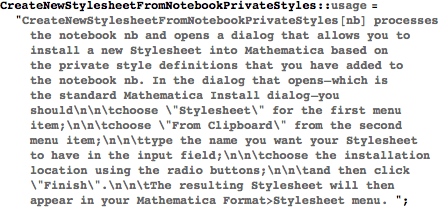
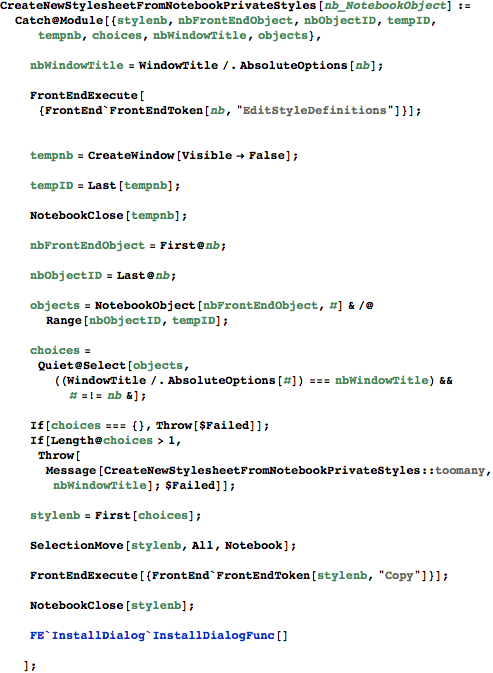
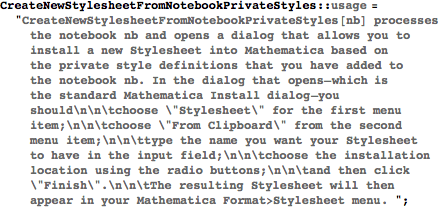
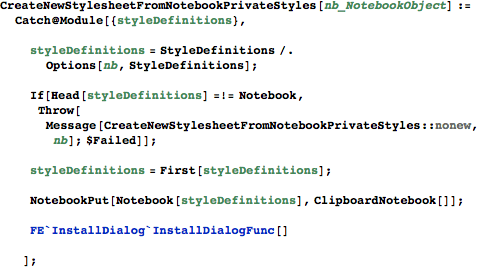
Permalink | Comments | Add Comment... Creating a new Stylesheet: an exercise in refinement Posted on: Tuesday, October 2, 2007 at 03:09 AM UT Notebook Version Many things are going into the next version of A WorkLife FrameWork, and I will write about them soon. In fact I have been busy with them and so haven't written to this blog for a while because of that. Today a question was asked on MathGroup about how to create and save one's own stylesheet. At first I answered the question in a pretty complex way. But then I learned some more and posted an update. Then after that, and after dinner, I sat down to write a function that would do the job automatically. I decided that it would be easy to do this: to write a function that would create a new StyleSheet for you to reuse as needed based on modifications to style definitions that you have made to a particular notebook. It wasn't quite a simple as I first thought though, and I will perhaps have to modify it somewhat before releasing it into A WorkLife FrameWork. Here is the code that I wrote... Well, hang on a moment. I really need to make a marketing announcement first... If you are reading this you are most likely on the website for A WorkLife FrameWork. Perhaps you have come here from MathGroup. Whatever circuitous route has brought you here, you really should take a moment to download a trial copy of A WorkLife FrameWork. It's a great product and will help you with all sorts of things. It extends Mathematica in all sorts of useful directions—and the simple function that follows is one of a huge number of such extensions. Give it a go. Please. And if you find it useful, it is quite inexpensive and is like getting several thousand hours of my consulting time for about a single hour's cost. Ok, so that's not enough to get you interested? Then take a look at the screencasts to get a better sense of a small bit of A WorkLife FrameWork's scope and usefulness. OK, I'm done with my marketing spiel. Now on to the code—hot off the press with the ink still drying. Here, first is the code (jump past it for continued discussion; also, you can download a Mathematica notebook with this blog post in it—including the code—by using the "Notebook" link at the end of the post): It turns out that this was trickier to do than I first thought. The problem is not processing the notebook's private Stylesheet. Rather the problem is figuring out how to get the NotebookObject for that Stylesheet notebook. It's there, but the Mathematica function Notebooks[] doesn't show Stylesheet notebooks. This is by design. So one needs a trick to figure it out. And embedded in this code is a trick that I figured out. Now this piece of code seems to work fine (well, you should add a check to make sure that the notebook nb is open). But, I started to write this blog posting and, as I was writing it I realized that I could do this in a much simpler way. So between the previous two paragraphs I rewrote the code and came up with what follows. But I decided to leave the previous bit of code above in this blog posting because it shows something that is pedagogically interesting—at least I think so, and I learned something... So here is the revised version of the code (which also needs a check for whether the notebook, nb, is actually open. (That's easy to do, but the way I do it is to use a function, NotebookOpenQ, that is inA WorkLife FrameWork, but I want to make this posting independent of that. One way to do it is to evaluate NotebookInformation[nb] and if it doesn't return $Failed then nb is open...)
The function FE`InstallDialog`InstallDialogFunc is not documented in Mathematica, but it does the job that is required. Now, that really is a bit simpler. I will sit on it a bit, add a bit of functionality, and then add it to the StyleSheetsPalette for A WorkLife FrameWork for easy use. Perhaps I should have thought a bit more before coding the first version, but I learned something from the process... So, I hope that you find this useful.
|
|








All material on this website Copyright © 2005-2010, Scientific Arts, LLC.